
created by ChatGPT Image 1.5
The Context Window Lie: What You Can Actually Use in Gemini, ChatGPT, and Claude
I was skiing yesterday when a Reddit post I’d seen that morning kept nagging at me. Someone had tested Gemini’s famous “1 million token context window” and found that in practice, typical users could only access about 32,000 tokens in a conversation.
One million versus thirty-two thousand. That’s not a rounding error. That’s a 97% gap between marketing and reality.
So I went down the rabbit hole. Here’s what I found.
The Difference Between “Context” and “Conversation”
First, let’s clear up something that trips up most people. There are really two numbers that matter:
Context window is the total amount of information the model can “see” at once. This includes your conversation history, any files you’ve uploaded, system instructions, and the model’s own response.
Conversation window is how much back-and-forth chat you can actually have before the system starts forgetting earlier messages or cuts you off.
These are not the same thing. And the gap between them explains why that Reddit post was right.
When Gemini says “1 million tokens,” they mean the model itself can process that much. But the web interface you’re using? It often reserves most of that capacity for file uploads and internal overhead, leaving a much smaller slice for your actual conversation.
Think of it like a restaurant that seats 200 but only takes reservations for 30. The capacity exists. You just can’t use it.
What You Actually Get: Platform by Platform
Here’s the reality as of January 2026. I’ve broken this down by consumer paid subscriptions and enterprise or workspace tiers.
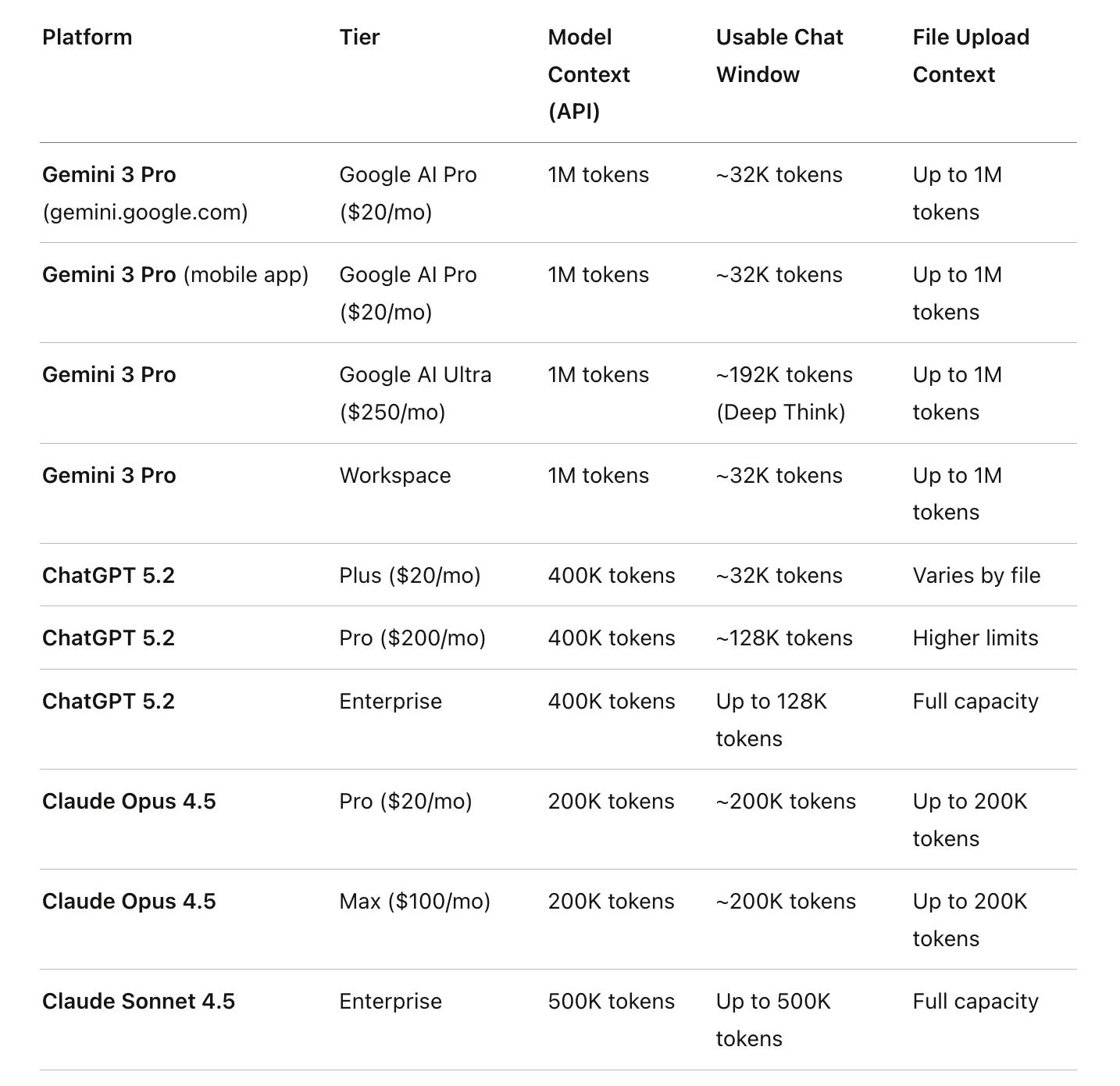
A few things jump out.
Gemini 3 Pro has the biggest context window at 1 million tokens. But it also has the biggest gap between marketing and reality. Through the consumer web and mobile apps, you’re limited to roughly 32K tokens of actual conversation. The rest is reserved for file uploads and system overhead. Even Google AI Ultra subscribers (at $250/month) only get about 192K in Deep Think mode.
ChatGPT 5.2 bumped the model’s context to 400K tokens. But the web interface still caps conversations: 32K for Plus subscribers, 128K for Pro. The full 400K is only accessible through the API.
Claude is the outlier. The 200K token context window is largely accessible for actual conversation in Pro and Max subscriptions. Enterprise customers using Claude Sonnet 4 get 500K. Claude made a different choice: give users more of what they’re paying for in the interface itself.
Why This Matters for Your Work
If you’re using AI for quick questions, none of this matters. 32K tokens is still about 24,000 words, enough for most conversations.
But if you’re doing serious work, analyzing a 100-page contract, maintaining context across a long research session, or having the AI remember nuances of a complex project, these limits bite hard.
I’ve had conversations where I’m deep into analyzing a document and suddenly the AI “forgets” something we discussed 20 minutes ago. That’s the conversation window hitting its limit. The information didn’t disappear from the uploaded file. It disappeared from the active conversation context.
How to Actually Access Full Context Windows
Here’s the good news. There are ways to get what you’re paying for.
Google AI Studio is where you can access Gemini 3 Pro’s full 1 million token context window in a chat-like interface. It’s free (with rate limits on the free tier). The tradeoff is a more technical interface. But if you need to analyze a massive codebase or stack of legal documents, this is how you do it with Gemini. Super important note: you can use AI Studio with a paid API key (which is what I do) so that Google doesn’t have access to train on your data. I strongly encourage you to do this. You get higher limits. AI Studio is an incredibly powerful tool and gives you the fullest access to the total model.
Direct API access through tools like TypingMind (which I use) gives you the full context windows of any model. You’re paying per token, but you get exactly what the model is capable of. For ChatGPT 5.2, that means access to the full 400K. For Gemini 3 Pro, the full 1M.
Claude’s Projects feature uses retrieval-augmented generation to let you work with larger amounts of information than the context window itself. Only relevant content gets loaded into active context, so you can maintain a large knowledge base without burning through tokens.
What to Do Monday Morning
Audit your actual usage. If you’re hitting context limits regularly, you’re losing productivity.
Try Google AI Studio if you need Gemini’s full context for document analysis. It’s free.
Consider API access through Google’s AI Studio or a product like TypingMind if you do heavy AI work. Per-token cost is often lower than subscriptions, and you get full access to the full context window.
Match the tool to the task. Gemini for massive document ingestion. Claude for long conversations where you need maximum chat context. ChatGPT for its ecosystem.
Test your own limits. Have a long conversation and see when things degrade. Knowing your ceiling helps you plan.
The Bottom Line
Marketing numbers aren’t lies exactly. But they’re not the whole truth.
That 1 million token context window exists. You just can’t use it the way you’d expect through the standard interface. Understanding the difference between what a model can do and what an interface lets you do is the difference between real value and invisible frustration.
The good news: Google AI Studio and API access let you tap the full capability. The question is whether you need it badly enough to leave the polished consumer apps behind.
Why I write these articles:
I write these pieces because senior leaders don’t need another AI tool ranking. They need someone who can look at how work actually moves through their organization and say: here’s where AI belongs, here’s where your team and current tools should still lead, and here’s how to keep all of it safe and compliant.
In this article, we looked at the gap between what AI vendors market and what their interfaces actually deliver, specifically the difference between context window capacity and usable conversation limits. The market is noisy, but the path forward is usually simpler than the hype suggests.
If you want help sorting this out:
Reply to this or email me at steve@intelligencebyintent.com. Tell me where your team is hitting friction with AI tools, whether that’s conversations that lose context, document analysis that stalls, or confusion about which platform fits your workflow. I’ll tell you what I’d test first, which part of the Gemini/Claude/ChatGPT stack fits your actual use case, and whether it makes sense for us to go further than that first conversation.
Not ready to talk yet?
Subscribe to my daily newsletter at smithstephen.com. I publish short, practical takes on AI for business leaders who need signal, not noise.
Final Note:
I researched these numbers to the best of my ability - if there’s a mistake in here it’s mine. If you find a number that’s not accurate please let me know and I will comment or update the article.
Steve Smith
Legal AI consultant with 25+ years executive leadership. Wharton MBA. Helping law firms adopt AI with CLE-eligible workshops and implementation sprints.
Learn more about SteveThis article was originally published on Intelligence by Intent on Substack . Subscribe for weekly insights on AI adoption in legal practice.