
Image create by GPT Image 1.5
Why Claude Is Probably the Best AI for Your Law Firm Right Now
TL;DR: After working with thousands of lawyers across hundreds of organizations and testing every major AI platform daily, I’ve come to a conclusion I’ve been avoiding: if you made me pick one AI tool for a law firm today, it’s Claude. Not because it’s perfect. Not because it’s the only option. But because it does the three things lawyers actually need better than anyone else: it writes like a lawyer, it works with your documents natively, and it can be locked down to meet your ethical obligations. Here’s how to think about it, what to watch out for, and what to do this week.
The Recommendation I’ve Been Trying Not to Make
I’ve spent the last two years being deliberately agnostic about AI platforms. When I stand in front of a room of attorneys at a bar association event or sit across from a managing partner during a training session, I don’t sell tools. I teach capabilities. I show what’s possible. I let the work speak for itself.
But I’ve been quietly tracking my own usage, and the numbers don’t lie. Claude now handles about 60% of my daily work. Gemini takes another 30%. ChatGPT, which used to be my primary tool, has dropped to maybe 10%. That shift happened gradually, and it happened because of results.
This past weekend, a blog post from attorney Zack Shapiro went viral on X. Shapiro runs a two-person boutique law firm focused on startups and venture capital, and he wrote a detailed account of how he’s built his entire practice around Claude. He called it “The Claude-Native Law Firm.” His opening story landed hard: the night before a client’s acquisition closing, opposing counsel dropped a letter demanding several key deal terms be restructured. By 11 p.m., working with Claude, he had a clean package of revised positions with cross-references to the counterparty’s own language. The deal closed the next morning.
That story resonated because I see versions of it every week in my training sessions. But Shapiro’s piece, as good as it was, left out some things that matter enormously to the managing partners and firm leaders I work with. So let me fill in the gaps and make the case I’ve been avoiding.
What Makes Claude Different for Legal Work
Let me start with the writing. I’ve tested Claude, ChatGPT, and Gemini on identical legal drafting tasks hundreds of times. Claude consistently produces output that sounds most like a senior associate wrote it. The sentence structure is more natural. The reasoning is more careful. It hedges where a good lawyer would hedge and takes positions where a good lawyer should take positions. This matters because if your AI output reads like a robot wrote it, you’re going to spend more time editing than you saved.
But here’s where it gets interesting for day-to-day practice. Claude can work directly with Microsoft Office files in ways that no other AI can match right now. And I don’t mean “paste your text in and I’ll reformat it.” I mean Claude can open a Word document, make edits, and produce output with tracked changes. Real tracked changes, visible in Word, that your opposing counsel can review in the normal redline workflow they already use. Shapiro flagged this in his piece, and he’s right that it’s a technical capability most lawyers don’t even know exists. I’ve written about this in the past. Claude manipulates .docx files at the XML level, which means it preserves formatting, styles, and revision history. For transactional lawyers doing contract markups, this alone is worth the price of admission.
The Excel capability matters just as much, even though it gets less attention. I’m working with several clients right now who need to build complex financial models, matter budgets, and data analysis for litigation. Being able to describe what you need in plain English and have Claude produce a properly formatted, formula-driven spreadsheet is a huge time saver. Think about it this way: instead of spending 45 minutes building a comparative fee analysis or an asset schedule, you describe what you want, and you get a working spreadsheet in two minutes. The numbers aren’t always perfect on the first pass, but you’re editing a draft instead of staring at a blank grid.
Cowork Changes What “Using AI” Means
Most lawyers’ experience with AI is a chat window. You type a question, you get an answer, you copy and paste. That’s useful, but it’s also limiting.
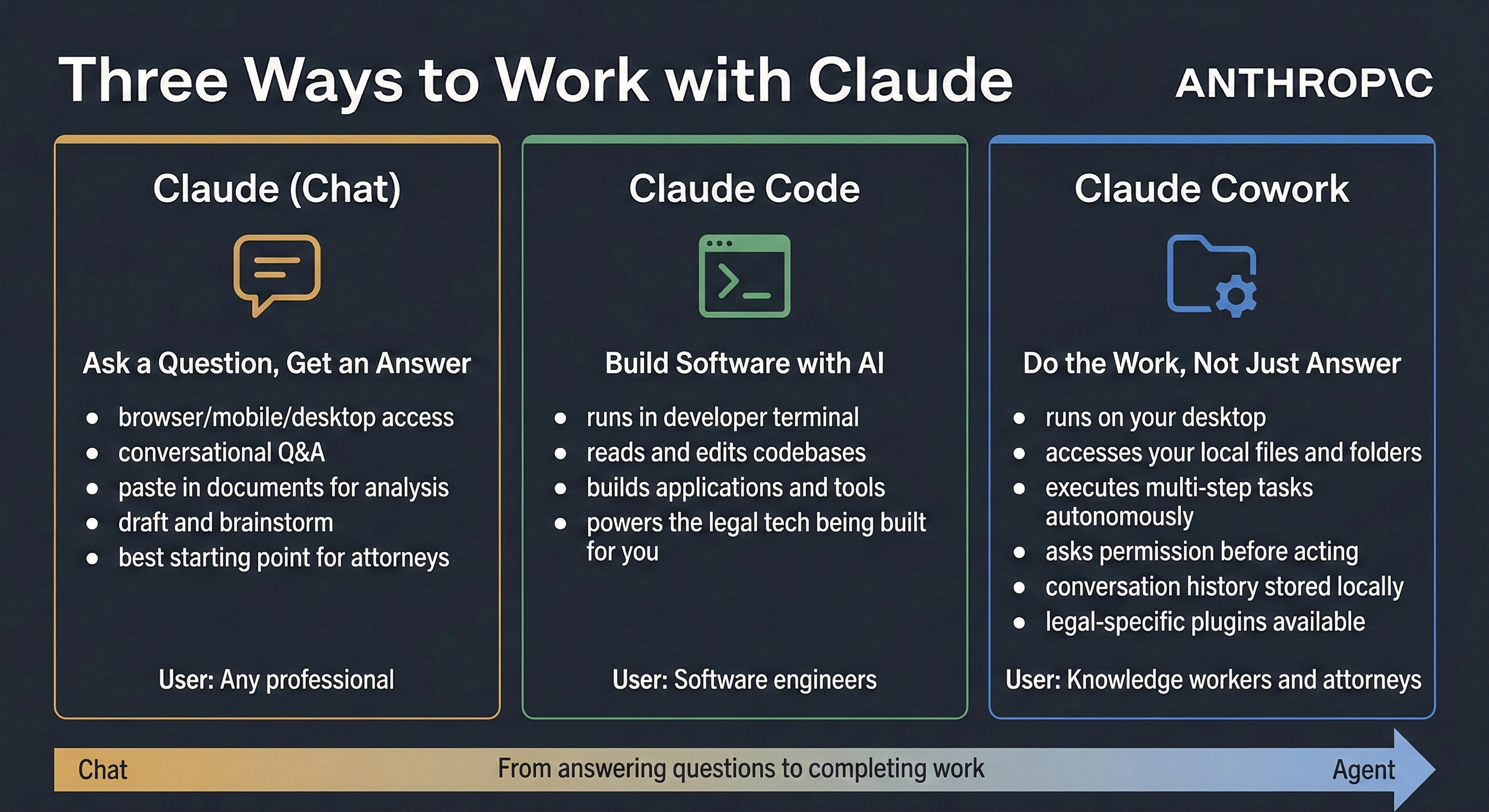
Claude’s Cowork mode is something different. It can read entire folders of documents, create new files, and edit existing ones with minimal back-and-forth. Shapiro described three modes: Chat for conversational analysis, Cowork for autonomous document work, and Code for custom development. For most lawyers, Cowork is the breakthrough because it turns Claude from a conversation partner into something closer to a research assistant who can actually touch your files.
Here’s what I mean. You can point Cowork at a folder containing a purchase agreement, disclosure schedules, and an opposing counsel letter. It will read everything, cross-reference provisions, flag inconsistencies, and produce a written analysis, all without you copying and pasting a single paragraph. For due diligence, contract review, and deal preparation, this is a fundamentally different way of working.
I’ve had several clients recently ask me the differences between Claude chat, code, and cowork. Here’s a little infographic I put together for them:
Claude Skills and Projects: The Parts Shapiro Got Right
Shapiro made an important point about custom skills, which are essentially instructions you write that encode your professional judgment into reusable templates. You build a skill once that captures how you analyze an indemnification clause or evaluate a non-compete, and Claude applies your thinking consistently across every matter.
This is powerful. But I want to be honest about who it’s for right now. If you’re a technically comfortable solo or small-firm practitioner, skills are a genuine force multiplier. If you’re a 50-person firm trying to roll this out across practice groups, you’ll need someone with the patience to build and test these things before they’re reliable enough for production use. It’s not plug-and-play. Not yet.
What Shapiro didn’t mention, and this surprised me, is Claude Projects. Projects let you create a dedicated workspace for a specific matter, load it with relevant documents, set custom instructions, and maintain context across multiple conversations. For a litigation team working a case over six months, or a corporate group managing a transaction, this is arguably more immediately useful than custom skills. It requires zero technical ability. You drag in your documents, write a few sentences about what you need, and start working.
Memory and Personalization: The Quiet Advantage
Claude’s memory feature has gotten good enough that it’s worth talking about. The system learns your preferences, your writing style, and the context of your work over time. After a few weeks of regular use, it starts to feel less like a generic tool and more like an assistant who knows how you operate.
This matters because legal work is full of firm-specific conventions. The way your firm formats memos. The boilerplate your partners prefer. The jurisdictions you practice in most often. Claude picks these up and applies them without being reminded. It’s a small thing that saves real time across dozens of interactions per day.
The Security Conversation Every Firm Needs to Have
Here’s where Shapiro’s piece had a significant gap, and it’s the gap that keeps me up at night when I’m working with law firms.
Most attorneys who hear about Claude are going to sign up for a free or Pro account and start uploading client documents. This is a problem. Individual consumer accounts do not provide the data protection that your ethical obligations require. Period.
Think about it this way: your duty of confidentiality under Model Rule 1.6 doesn’t disappear because the tool is useful. And ABA Formal Opinion 512, released in July 2024, makes clear that lawyers must understand the privacy policies and data handling practices of any AI tool they use before putting client information into it.
Claude’s Team plan (starting at $25 per seat per month with a minimum of five users) gives you centralized administration and better data protections. The Enterprise plan adds SSO, audit logging, role-based access controls, compliance APIs, and custom data retention policies. For any firm beyond a handful of attorneys, Enterprise is the right answer. It’s also where you’ll find the ability to get a Business Associate Agreement if you’re handling health-related information.
The cost difference between a consumer account and an Enterprise deployment is real. But compare it to what you’re spending on Westlaw, Lexis, or specialized legal AI tools. A Team plan for 20 attorneys runs roughly $500 to $600 per month. An Enterprise deployment for the same group might run $1,000 to $2,500 per month depending on configuration. That’s less than most firms spend on a single associate’s annual CLE budget.
The Ethical Case for Adopting AI (and Against Ignoring It)
Shapiro made a bold claim in his post: that not using AI may eventually become harder to defend than using it. He’s pushing on an important point, and it’s one I’ve been making in bar association presentations for over a year.
ABA Model Rule 1.1, Comment 8 requires lawyers to keep current with technology, including understanding the benefits and risks of tools relevant to their practice. As of early 2026, 40 states have adopted some version of this technology competence requirement. Puerto Rico went further in January 2026 with a new Rule 1.19 specifically addressing technological competence and diligence. The direction is unmistakable.
But here’s the part that deserves more attention: competence cuts both ways. Using AI without understanding its limitations is just as dangerous as ignoring it entirely. The most hazardous failure mode isn’t a hallucinated case citation. Those are easy to spot. It’s a plausible-sounding legal analysis that misses something only an experienced practitioner would catch, delivered in a format that looks polished enough to inspire false confidence. If you hand a junior associate a custom skill that encodes your analytical approach, they can produce impressive-looking work product. But can they effectively supervise output generated from judgment they haven’t developed themselves? That’s the question every firm leader needs to sit with.
What Claude Doesn’t Do (and What Else You Should Consider)
I’m recommending Claude as the primary tool, not the only tool. Two limitations matter:
First, Claude doesn’t have access to legal databases. It can’t pull cases from Westlaw or Lexis. It doesn’t know about unpublished opinions from last week. For primary legal research, you still need your existing research platforms, and you still need to verify every citation independently. The verification discipline here cannot be overstated. A Stanford study found that in cases where attorneys submitted AI-influenced filings with inaccuracies, 90% were solo or small-firm practitioners, and half involved ChatGPT. Most of these were avoidable with basic citation checking.
Second, for certain types of document-intensive analysis, Google’s NotebookLM is hard to beat. I use it regularly with clients because it lets you load hundreds of source documents into a single workspace and then query across all of them. For large-scale document review, regulatory research, or building a knowledge base from existing firm materials, NotebookLM adds real value as a complement to Claude.
And to Shapiro’s dismissal of specialized legal AI products as “just wrappers”: that’s true for a sophisticated practitioner who builds custom skills, but it’s potentially misleading for a 200-attorney firm. Tools like Harvey offer governance infrastructure, audit trails, and firm-wide administration that Claude’s consumer or even Team product doesn’t provide out of the box. For large firms that need centralized oversight, those features solve exactly the problem that general counsel and managing partners care about most.
What to Do This Week
Audit your firm’s current AI usage. Find out who’s using what, on which accounts, with which client data. I guarantee you’ll find attorneys using personal consumer accounts for work. Fix that first.
Start a Claude Team or Enterprise evaluation. The Team plan has a five-seat minimum and takes about 15 minutes to set up. Run it as a pilot with your most AI-curious practice group for 30 days.
Create your first Claude Project. Pick a current matter, upload the key documents, write a two-sentence instruction about what you need, and start working. This will teach you more in an hour than any webinar.
Build a verification checklist. Before any AI-generated work product goes out the door: independent citation check, second-pass review for reasoning errors, and a sign-off from someone with subject matter expertise.
Update your engagement letters. Add a provision addressing AI-assisted work product. Your clients deserve to know, and your malpractice carrier will eventually require it.
The Model Will Change. Your Process Shouldn’t.
One more thing Shapiro’s piece didn’t address: the tool you’re using today won’t be the same tool three months or six months from now. Model updates can change behavior in ways that break existing workflows. A skill you built for one version of Claude might produce different results on the next. Anthropic can change capabilities, pricing, or terms at any time.
Build your processes around principles, not platforms. Document verification, human review, ethical compliance, matter-specific context: those things don’t change when the model updates. The firms that win in 2026 aren’t the ones that master one tool. They’re the ones that build an AI-literate culture where every attorney understands what these tools can do, what they can’t, and where the human judgment still lives.
Right now, today, Claude is the best vehicle for getting there. Ask me again in one, three, or six months and the answer might be different. That’s not a weakness of this recommendation. It’s the whole point.
If you want help sorting this out:
Reply to this or email me at steve@intelligencebyintent.com. Tell me what’s slowing your team down and where work is getting stuck. I’ll tell you what I’d test first, which part of the Claude, Gemini, or specialized legal AI stack fits your workflows, and whether it makes sense for us to go further than that first conversation.
Not ready to talk yet?
Subscribe to my daily newsletter at smithstephen.com. I publish short, practical takes on AI for business leaders who need signal, not noise.
Steve Smith
Legal AI consultant with 25+ years executive leadership. Wharton MBA. Helping law firms adopt AI with CLE-eligible workshops and implementation sprints.
Learn more about SteveThis article was originally published on Intelligence by Intent on Substack . Subscribe for weekly insights on AI adoption in legal practice.